Scheme Master in Pawn Broking Software | FinApp
Scheme Master in Pawn Broking Software
Every pawn business can have its own set of rules for managing the loans. Some businesses calculate interest on a monthly basis, while others do it every day. Certain businesses also calculate the interest rate on the basis of the loan period. Moreover, many set their own penalties for late payments, closing charges and document charges, etc.
It may get difficult for businesses to remember all the rules for every scheme.
Moreover, businesses can offer many different schemes, making it difficult to process the loans quickly.
To resolve this, it is essential for pawn businesses to manage their loan schemes effectively. This allows them to set rules for every scheme, thereby removing the hassles of manual calculations and making the overall process easier.
Why Pawn Brokers Need Different Loan Schemes
There are numerous pawn loan schemes that a pawn business can offer. However, every business has varied requirements.
For instance, one scheme can use monthly interest, while the other can use daily interest. Another scheme may have varied interest on the basis of loan periods. There may also be penalties on delayed payments for the other.
Pawn brokers may need to manage a number of different schemes, including:
- Daily or monthly interest
- Interest rates for different durations
- Loan duration
- Minimum interest days
- Penalties for late payments
- Increased interest
- Gold percentage or LTV
- Closing charges
- Document charges
All these details need to be kept in mind for processing every loan, which makes it extremely tedious and time-consuming to do it all manually.
How Businesses Usually Handle Loan Schemes
If a business does not have the option to manage loan schemes in an organized manner, they tend to keep a record of their rules in different spreadsheets, notebooks or through manual entry.
It may be easy to manage for a few business loans. However, for a business with numerous customers and thousands of loans, it gets extremely difficult to recall every rule for every loan scheme.
Staff also needs to remember or manually look up the applicable interest, loan duration and penalties for every loan scheme.
How CK Tech Pawn Broking Software Can Help
CK Tech Pawn Broking Software has a Scheme Master option that helps pawn shops manage all their pawn loan schemes.
This is extremely handy for businesses that deal with a large number of customers and have several loan schemes.
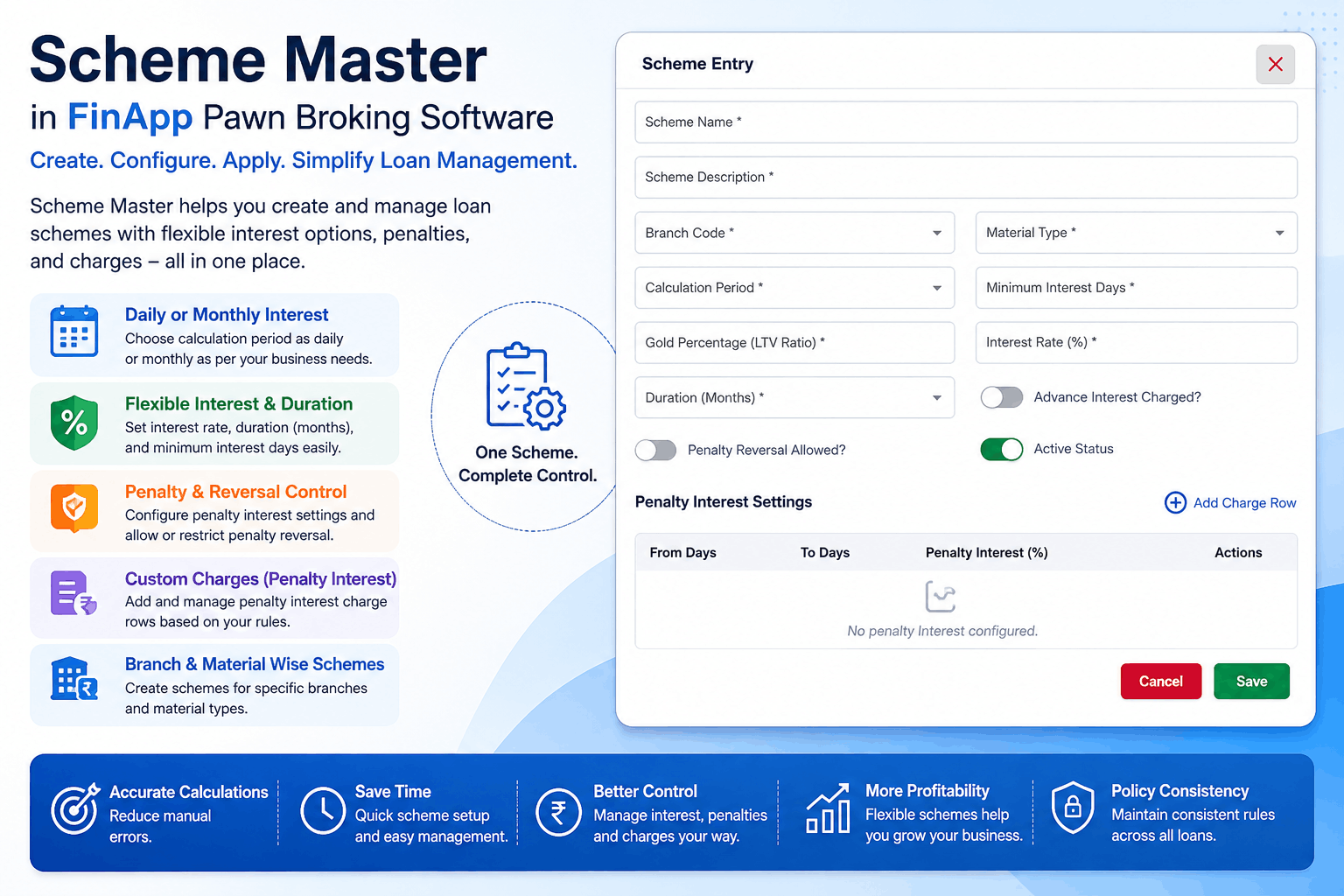
A scheme generally includes information about the scheme name, description, branch, material, daily or monthly interest, minimum interest days, interest rate, loan duration, increased interest, gold percentage or LTV, interest in advance, penalties, closing charges, document charges, etc.
Once a scheme is created, a business can use it to process their applicable loans in the future, without having to manually enter the same details every time.
Create Daily or Monthly Interest Schemes
Businesses usually calculate interest on a daily or monthly basis, depending on their requirements.
For instance, some calculate interest on a monthly basis, some on a daily basis, whereas some calculate the interest on a monthly basis, but only for the minimum interest days.
Using CK Tech Pawn Broking Software, businesses can easily create different schemes for the applicable interest calculation, including:
Monthly Interest Scheme
This option allows businesses to create a monthly interest scheme.
Daily Interest Scheme
This option allows businesses to create a daily interest scheme.
Set Interest Rates for Different Loan Durations
Sometimes, businesses offer the same loan scheme but with different interest rates on the basis of the loan period.
For instance, a pawn business can offer a higher interest rate for a longer loan duration.
Using the Scheme Master, businesses can set the interest rate and loan duration and additionally, even set the increased interest rate for longer loan durations.
This way, the system can automatically calculate the interest in accordance with the set scheme, instead of manually calculating the interest on every loan.
Set Minimum Interest Days
Sometimes, businesses only allow the borrower to take the loan for a minimum number of days before they can return it, even if the customer pays the pawn shop before the minimum interest days.
Using CK Tech Pawn Broking Software, businesses can configure these minimum interest days under the scheme settings.
This option can also be handy for applying different minimum interest days for different schemes.
Manage Penalties for Late Payments
When a customer pays the due amount late, many pawn businesses charge them a penalty.
Instead of manually calculating the applicable penalty for every customer, businesses can use the Scheme Master to manage penalties for late payments.
For instance, a business can configure the system to apply a penalty for every late payment on a weekly, monthly or annual basis.
It is also possible to set different penalties for every additional late payment.
Increase Interest Based on the Loan Conditions
Many pawn businesses increase their interest rates after a certain period or for specific loan conditions.
These increases can be managed using the increased interest option. Businesses can set increased interest on a weekly, monthly or yearly basis.
Manage Closing and Document Charges
Apart from the interest on the amount due, many pawn businesses also charge their customers various other fees, including closing charges and document charges.
Using the Scheme Master, businesses can configure all these additional closing and document charges under every applicable scheme.
This means they do not have to manually enter the same charges every time.
Set Gold Percentage or LTV
Many gold loan businesses use LTV (Loan to Value) to determine the maximum amount a customer can get against their gold ornaments.
The Gold Percentage or LTV option allows businesses to configure the gold percentage or LTV for their gold loan schemes.
Manage Schemes Based on Branch and Material
Many businesses also have different scheme requirements for different branches and materials.
Using the Scheme Master, businesses can set the branch and material type in the scheme to ensure their system processes it according to their set conditions.
How to Create a Scheme
The process to create a scheme basically depends on the set rules that a business wants to apply to their scheme.
In general, a business can create a scheme as follows:
Benefits of Scheme Master
Applying a predefined scheme can significantly benefit a pawn business. Not only does it make the process of loan processing easier, but it also ensures consistency in the loan processing.
Fewer Manual Calculations
The same scheme does not have to be calculated again and again manually. A business can save the scheme and use it to process future loans directly from the system.
Consistent Rules
The same interest rates, loan duration, additional charges, etc. will apply to every loan scheme, ensuring fewer chances of errors or inconsistencies.
Various Schemes
A business can create different schemes for numerous loan processing requirements.
Flexible Interest Calculation
Daily and monthly interest options give businesses more flexibility in their interest calculations.
Better Penalty Management
Businesses can configure penalties according to their requirements for each loan scheme.
Custom Document and Closing Charges
Document and closing charges can be added according to each loan scheme.
Easier Loan Processing
Once schemes are created, it becomes easier for the business to use them for processing loans.
Frequently Asked Questions
Related Articles
You Might Also Like

Customizable Reports in Pawn Broking Software | CK Tech Solutions

Mobile App for Pawn Brokers | FinApp Pawn Broking Software
Top 10 Features Every Gold Loan Software Must Have
Income And Expense Management

Pawn Broker Notification Software | CK Tech Solutions
Pawn Broker Reminder Software
Auction Management Software for Pawn Brokers | FinApp Pawn Broking Software